How to Verify Your Business on Google: 2026 Steps
Verify your Google Business Profile: the methods Google offers, how long each takes, and what to do when the postcard never arrives or verification fails.
A roofer taps Get verified on a Friday afternoon. Google gives him one option: a postcard. It goes to the shop address he stopped using last spring.
Three weeks later his hours are still frozen. He cannot add a photo, and he cannot answer the review that came in on Tuesday.
Verify your Google Business Profile by signing in at business.google.com, opening your listing, and selecting Get verified. Google decides which methods you qualify for: postcard, phone or text, email, video recording, or live video call. Enter the code or pass the review, then wait up to five business days. Verification unlocks editing the name, hours and other details customers see.
That is the short answer. The rest of this page is the part owners get stuck on: which method they actually have, what breaks it, and how long the wait really runs.
Most writing on this topic comes from people watching the process from outside. We run it for home-service owners, so this page carries the failures we see and the fix for each one.
We also pulled the live results for this query before writing. 13 of the first 20 came back as Google’s own help links and 3 were videos, which says a lot about how little first-hand writing sits here.
TL;DR
- Google picks your verification methods, and you cannot switch to a different one.
- A postcard costs the most weeks. Most cards land within 14 days, and the code dies after 30.
- A returned Get verified button means partial verification, and you can still finish it.
- Verification unlocks editing. Ranking takes separate work.
Is my business already verified on Google?
You are verified when the dashboard shows no verification banner and lets you edit the name, hours and photos. Open business.google.com, pick the listing, and look at the top of the page. A listing that still shows Get verified is not verified, even if it appears in Google Maps.
When we open a profile for a new owner, the banner is the first thing we read. It tells us more about the state of the listing than any report. Most owners still call the whole thing Google My Business, and the profile behind that old name is the listing you are looking at.
A profile with no banner and full edit rights is owned by the account signed in at that moment. A profile with the banner is visible but uncontrolled.
That gap catches owners every week. Google can show a name, a category and a phone number in Google Search for months while nobody owns the profile. Google ties editing rights to verification, so seeing your listing and owning it are two different states (verify your business on Google).
If the profile is not yours yet, open it in Maps and look for Claim this business. Choosing that option runs the same verification path, and adding a profile from scratch starts free at business.google.com/add (add or claim your Business Profile).
A listing can show in Maps for months with nobody owning it, and an unowned listing is one you cannot correct.
How do I verify my business on Google, step by step?
Sign in at business.google.com, open the listing, select Get verified, and complete the method or methods Google offers. Then wait for the review. The steps are short, because the work sits in the method Google assigns.
The order that works:
- Sign in with the Google Account that should own the profile.
- Pick the listing, or add it at business.google.com/add.
- Select Get verified.
- Read the method list. That list is fixed for this profile and this business.
- Complete the method: enter the code, record the video, or take the call.
- Watch the dashboard for the result.
Google states that verification methods are automatically determined for your business, cannot be changed, and you may need more than one. That is the rule owners push against hardest. We field the same request most weeks: can Google send a postcard instead? There is no step for that, and support will not switch the method.
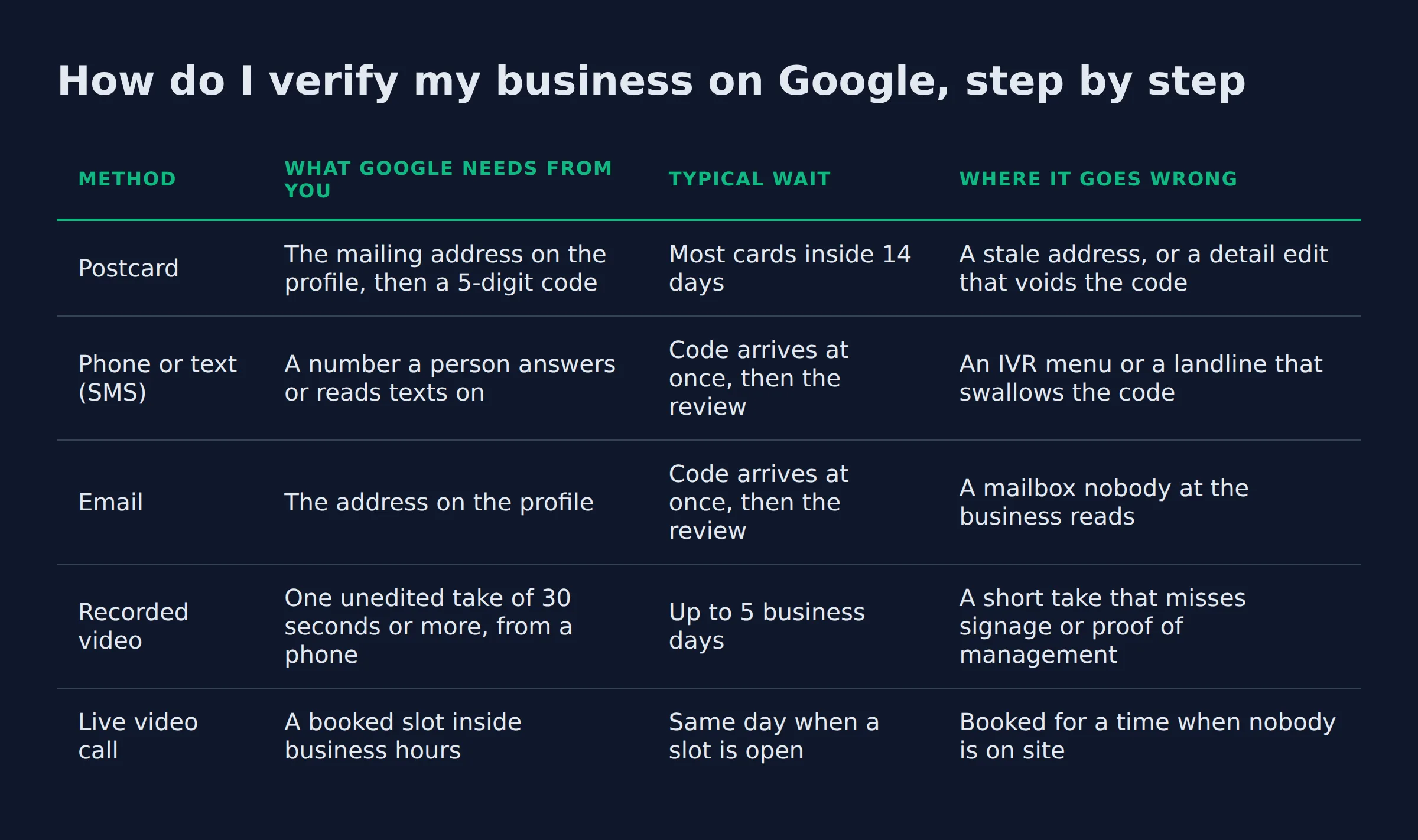
Here is what the five methods ask of you, side by side:
| Method | What Google needs from you | Typical wait | Where it goes wrong |
|---|---|---|---|
| Postcard | The mailing address on the profile, then a 5-digit code | Most cards inside 14 days | A stale address, or a detail edit that voids the code |
| Phone or text (SMS) | A number a person answers or reads texts on | Code arrives at once, then the review | An IVR menu or a landline that swallows the code |
| The address on the profile | Code arrives at once, then the review | A mailbox nobody at the business reads | |
| Recorded video | One unedited take of 30 seconds or more, from a phone | Up to 5 business days | A short take that misses signage or proof of management |
| Live video call | A booked slot inside business hours | Same day when a slot is open | Booked for a time when nobody is on site |
Google recommends video verification when the profile qualifies for it. Take it when it is offered. It closes in days instead of weeks, and it does not depend on mail.
The method list is Google’s decision, so the useful question is how to pass the one you were given.
How does postcard verification work, and what breaks it?
Google mails a card to the profile address with a 5-digit code printed on it, and most cards arrive within 14 days. You enter that code in the Code field. The code stops working after 30 days, and editing the name, address or category voids it sooner.
The address that matters is the one on the profile today, not the one you meant to update. That single detail explains most failed postcards we deal with. An owner moves the crew to a new yard, fixes the website footer, and never touches the profile address. The card goes to the old place and nobody is there to collect it.
Three more rules bite owners who are trying to be helpful:
- Requesting a new code invalidates the first one, so a second request costs you the wait you already served.
- Any edit to the name, address or category while the card is in the mail cancels the code.
- 30 days is the full life of the code, and it runs from the day it was generated.
All three come from Google’s page on the postcard verification code. Read them before you touch the profile.
One postcard request and one wait. A second request cancels the first card.
What do I need to show in a video verification?
Record one unedited video of at least 30 seconds on your phone and upload it through the profile. Walk from the street to the work area in one take. Show the sign and proof that you run the place. Keep bank details and other people’s faces out of frame.
For the full picture, see Google Business Verification Video.
Here is the walk order we use when we prep an owner, and the one that gets through:
- Start outside, wide enough that the sign and the street share the frame.
- Walk to the door and into the work area without cutting.
- Show proof of management: the register, the storage room, the point of sale, the tool cage.
- Finish on the space a customer would see.
Google spells out the video recording requirements on its own page, including the 30-second floor and the ban on sensitive documents. The recording has to be unique, so a video you used for another profile is no use here.
Framing is where these videos fail. The take that fails is short and quiet: 12 seconds of a driveway, a closed garage door, and no sign in frame. A reviewer cannot confirm a business from that.
For a service area business the shot list changes, because there is no storefront to film:
| What the video must show | Storefront business | Service area business |
|---|---|---|
| Signage | Permanent sign matching the profile name | Vehicle lettering, when you have it |
| Proof of management | Register, storage room or point of sale | Tools, stock or equipment you own |
| Location evidence | The street front and the interior | Street signs, landmarks or clear markers |
| Never in frame | Other people’s faces, ID or tax paperwork | Empty land with nothing to identify |
Google’s guidance for the service area business version asks for street signs, landmarks or clear markers, and says to avoid filming empty land. That is the whole difference between a pass and a rejection for a home-based operator.
The video that passes is dull: one take, sign in frame, then the room where the work happens.
Can you verify by phone, text, email, or a live video call?
Phone or text verification sends a code to a number a person can answer or read a message on. Live video calls run only inside the location’s business hours, so book a slot when someone is on site. Email sends a code to the address on the profile.
The phone method fails for one reason in our experience. A number that rings into a menu cannot read out a code. Google says the phone or text option needs a number you can answer or receive texts on. An IVR system is the classic way owners lose that code, and they never see a missed call.
Plenty of home-service shops run their business line through a menu. Press 1 for service, 2 for billing. By the time the recording ends, the code is gone.
The live call is the friendliest option and the one owners book badly. Google runs those calls inside the location’s live video call hours, which means the business hours on the profile. Book a slot for a Tuesday when the crew is out and the yard is empty, and you have built your own rejection.
Email is the quiet one. The address on the profile is often the one the last web person set up, and nobody at the business has the password.
Google calls the number on your profile, so put a number a human answers on it before you start.
How long does Google Business Profile verification take?
Plan on up to 5 business days for the review, and expect the occasional instant approval. A postcard adds mailing time on top of that, with most cards inside 14 days. Video review sits inside the same 5-day window.
Google reviews verification in up to 5 business days, rarely longer, and verifies instantly in some cases. The two fast cases worth knowing: a website already verified in Search Console, and bulk verification for a business with many locations.
The full clock, in the order you will live it:
- The card in the mail: most arrive inside 14 days.
- Entering the code: 2 minutes.
- The review: up to 5 business days.
- A video review: the same 5-day window.
- A live call: the first open slot inside business hours.
We time the first week of profile work to the card’s arrival, because nothing on the profile can change until it lands.
The wait you feel is the mailing clock, and it is the one part of this Google will not shorten for you.
What changes the day verification lands
Verification unlocks the editing panel. The name, the hours, the categories, the photos and the services all become editable. The account that verified also becomes the owner.
Google states the order plainly: verify first, then you can edit the business name and hours (verify your business on Google).
A verified profile still has to earn its own ranking. Owners hand us a freshly verified listing and expect the phone to ring that week. Ranking runs on relevance, distance and popularity, and prominence is where reviews and links come in (local ranking factors). Verification changes none of those.
So treat the first week after verification as a work week:
- Fill the primary category, the services and the hours properly, now that you can.
- Add photos of real jobs, not stock shots.
- Check that the name, address and phone match your website word for word.
- Ask the last few happy customers for a review.
One more handoff sits here that nobody mentions. Owner access and manager access are separate. The owner verifies, then invites the manager, and a manager cannot pass verification on the owner’s behalf. That trips up the owner who hands the login to a nephew and wonders why the video keeps failing.
If the profile is verified and the phone is still quiet, the next thing to check is distance and category. Another verification attempt fixes nothing. We walk that through in verified but still not showing up in Maps.
Verification gives you the keys to the profile. The map pack is a separate fight.
Why did Google ask me to verify my business again?
Google asks again when a core detail changes: the business name, the address, the category or the hours. It also asks when it could not fully confirm the business the first time. A Get verified button that comes back means the business was only partly verified.
Google’s page on fix verification issues or re-verify your business covers all three signals. A returning button means the business was not completely verified. A Review issues notification means a video was not accepted. A request for additional info usually follows a recent change to the profile.
The trigger we see most is a name edit. An owner trims the legal suffix off the profile name because it looks cleaner on a truck wrap, and the profile drops back into verification within a day. Same story with a category swap, or an address corrected to match a new lease.
None of that is a penalty. The profile is being re-checked because the thing Google matched to a real business just changed.
Any edit to the name, address or category can send the profile back through verification.
What do I do if verification fails or the code never arrives?
Confirm the address and phone on the profile, wait the full window, then request the code once more. If that fails, use the support path that opens after No More Ways To Verify. That form wants signage photos, a utility bill and your website URL.
Work down this list in order, because each step rules out the one below it:
- Confirm the address on the profile, character for character.
- Confirm the phone number is one a person answers.
- Check the spam folder and the inbox the profile actually uses.
- Wait the full window before requesting again.
- Then escalate through the support form.
When we trace a stuck verification, the fault sits on the address or the phone nearly every time. Save the form for after those checks.
BrightLocal reports an email Google sent in March 2026 titled Updates to how we verify your business details. It said Google may reach out by automated messages to the number on file, by call, text or WhatsApp (automated verification messages). Treat any message like that with care, and check the profile before you act on it.
The paperwork is where owners stall. Send the whole set in one go, clearly labelled, with file names a stranger can read (what to do when there are no more ways to verify).
Escalate with proof and paperwork once the checks come back clean.
Do service area businesses verify the same way?
Service area businesses use the same methods and the same review. The address stays hidden from customers, but the video has to prove where you actually work. Show street signs, landmarks or clear markers. Filming empty land is the fastest way to fail.
The postcard still needs a real mailing address, even though no customer ever sees it. Use the address where someone collects mail and where you keep the vehicle or the records. A yard, a storage unit or a home office all work, as long as the profile matches it.
Vendasta’s guide reports that Google rules out P.O. boxes and rented mailing addresses. A virtual office or a co-working space passes only when it is staffed and signed during business hours (verification by business type).
Google’s service area business video guidance asks for a walk or drive that shows the areas you serve, with something identifiable in frame. A street sign at the edge of your main town does more for a reviewer than a slow pan across a field.
Storefront and hybrid businesses verify the same way, with one addition. The video has to show permanent signage that matches the profile name, plus proof of management such as a register or a stock room (proof of management).
How the areas themselves are set up is a separate job, and how areas served work for a service area business covers it.
A home-based operator still needs a mailing address on the profile, because that is where the card goes.
Is a paid business verification service worth it?
Google charges nothing to verify a business, and no provider can buy an approval. A paid service earns its fee by prepping the profile, running the video and handling the support escalation. A promise of a faster yes is the red flag.
Adding or claiming a profile is free and starts at business.google.com/add, so the money never goes to Google. What you buy from a provider is time, and a second pair of eyes on the details that cause a rejection.
That trade can make sense. A roofing crew working daylight hours has no spare afternoon for a clean video walk. A re-recorded take after a Review issues notice costs another week. Third-party profile management is a normal arrangement when the owner keeps control of the account.
One rule holds for every provider. Google says it will never ask for your verification code, and it tells you not to share the code with anyone (postcard verification code). That includes the person who manages the profile. A code handed over is a profile handed over.
When the work runs through our local SEO service, verification is the first step and the profile build follows it.
A verification service can sell you prep and time. Approval is not theirs to give.
Where to start this week
Open the profile and look for the banner. Write down the method or methods Google offers you.
Then check the name, address and phone on the listing against the ones you actually use. That trio is what the trade calls NAP, and it causes most of the failures on this page. Fixing it costs nothing.
If a postcard is already in the mail, leave the profile alone until the code arrives. One edit can void the card.
If you want a straight read on where your Google visibility stands, a 15-minute call covers it.
FAQ
Can I verify my Google Business Profile without a postcard?
Often yes. Google assigns the methods, and many profiles qualify for phone, email or video instead of a card (verification methods). You cannot request a swap, so check the list Google shows before you assume the postcard is your only route.
Does a business need a website to get verified on Google?
No. A website is not one of the methods, and plenty of verified profiles have no site at all. A site that is already verified in Search Console can speed the review up, which is a shortcut rather than a requirement (verification timing).
How much does Google charge to verify a business account?
Nothing. Adding or claiming a profile is free and starts at business.google.com/add (add or claim your Business Profile). Any fee you pay goes to a provider for the labour, not to Google for the approval.
What happens if my profile is suspended after it was verified?
You can appeal the suspension through the profile, and the listing stays hidden while the appeal runs. Suspension is a separate problem from verification, and it usually points at a name, address or category mismatch rather than a failed code (what to check when the listing vanishes).
Can someone else verify the profile on my behalf, such as an agency?
Only with your account and your cooperation. The owner verifies, then adds the agency as a manager, and the code or the video still has to come from the business itself (manager access). Hand over manager access, never the code. If someone else already verified the listing, ask for a transfer of ownership instead of claiming it fresh (transferring a listing).
My profile says verified but I still cannot edit it. Why?
Usually because the account you signed in with is a manager, not the owner, or because an edit is waiting on review. Check who holds owner access, then try the same edit from that account before you start a new verification (fix verification issues).