My Reviews: Where to Find and Manage Google Reviews
Your Google reviews live on your Business Profile. Find them, reply to them, and know which ones Google will remove. A plain guide for local owners.
An owner sends us a screenshot at 11pm. His worst review is 3 weeks old and he still cannot find the reply button.
Type my reviews into Google and 2 different lists answer. A customer sees the reviews they wrote. An owner sees the reviews left on the business. This page is about the second list.
Your Google reviews live on your Business Profile, not in a separate inbox. Open your listing in Google Maps and tap Reviews, or open your Business Profile dashboard and choose Read reviews to reply. If you cannot see them, the usual cause is signing in with the wrong Google Account.
Most pages on this search stop at the tab. That is where the trouble starts. We sit inside owners’ profiles on calls every week, so this page covers the access failures and what happens after you hit send.
TL;DR
- Your reviews sit on your Business Profile. You read them in Maps, in Search, or in the dashboard.
- An empty list is usually the wrong Google Account, or a second listing holding part of the reviews.
- A reply posts under your business name, and your personal name stays hidden.
- Google removes policy breaks. A real customer’s bad review stays, so reply to it instead.
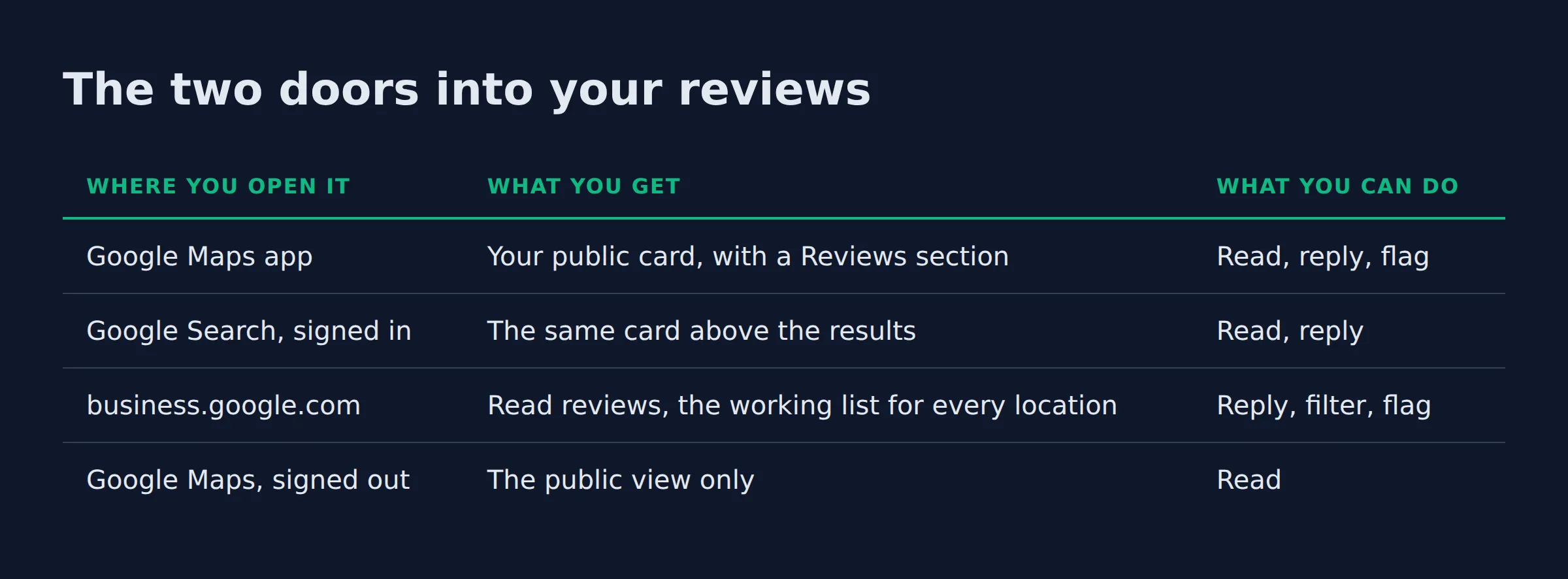
The two doors into your reviews
The reviews live on the listing. Every surface reads that 1 list through a different door, and which door you opened explains most of the confusion.
| Where you open it | What you get | What you can do |
|---|---|---|
| Google Maps app | Your public card, with a Reviews section | Read, reply, flag |
| Google Search, signed in | The same card above the results | Read, reply |
business.google.com |
Read reviews, the working list for every location | Reply, filter, flag |
| Google Maps, signed out | The public view only | Read |
In the Maps app, tap your business, scroll to Reviews, then tap Reply under any review. The app is the fast route. On a desktop, business.google.com gets you to the same list in fewer clicks, and it holds every location you manage in 1 place. Where to find your Business Profile walks that sign-in path step by step.
Both views let you sort by newest, highest or lowest rating. Start with the lowest rating. You will answer the hard ones while you still have the patience for them.
Finding the list is half the job. The other half is what you do next:
- Reply, which takes a minute and is public.
- Flag, for a review that breaks Google’s rules.
- Ask, through a review request link or QR code for the next customer.
The tab you open matters less than the account you are signed into.
Why are my reviews not showing up when I open my profile?
The usual cause is the Google Account, not the reviews. You are signed into an account that does not manage the listing, or the reviews sit on a second listing for the same business.
Owners and managers get invited by email. Each person needs their own Google Account to open the profile (manage your Business Profile owners and managers). A personal Gmail that was never invited opens an empty dashboard, and the reviews look gone.
The other cause is a duplicate. Google allows 1 profile per business, per its guidelines on representing your business. A second profile for the same address can carry reviews that were never merged.
The 5 cases we see, in order of how often they turn up:
| What you see | Usual cause | First check |
|---|---|---|
| Dashboard empty, public profile fine | Wrong Google Account | Sign out, search your name |
| Fewer reviews than last month | Second listing holding some reviews | Look for 2 pins on the map |
| No reply box on any review | Not verified, or no manager access | Read your role on the profile |
| A review you know about is gone | Removed under Google’s content rules | Read the prohibited content list |
| Reviews on a listing you cannot edit | Unclaimed profile, or a vendor holds it | Claim it or ask for manager access |
Start with the cheapest test. Search your business name while signed out of Google. The public card shows the reviews if they still exist, and it costs you a minute.
Search signed out before you report anything missing. The public view tells you whether the reviews exist at all.
Most of the “my reviews are gone” calls we take end at the account switch. The rest split between a second listing nobody claimed and a removal the owner noticed weeks later. Start there.
Why does the review count on Maps differ from the count in my dashboard?
The number on the card counts every rating on the listing, including people who tapped stars and wrote nothing. The dashboard list counts written reviews you can open and answer. The 2 numbers measure different things.
A star-only rating moves the total. It never appears as a row you can reply to. That is the boring answer, and it is the right one most weeks.
| What you see | Where it shows | What it counts |
|---|---|---|
| A rating with a total beside it | Maps and Search card | Every rating on the listing |
| A shorter list under Read reviews | Business Profile dashboard | Written reviews you can answer |
A small gap is arithmetic. A large one usually means a second listing is still collecting reviews for the same business, and that gap grows the longer it sits. In the audits we run, the count that will not settle is the count with a duplicate behind it.
The fix is a merge or a report to Google. A support ticket about 1 review goes nowhere. The 1 profile rule is what makes a second listing a problem, per Google’s guidelines.
A gap of a few is noise. A gap that grows every month is a second listing.
How do I reply to a bad review without making it worse?
Reply once, in public, in 3 short sentences. Thank them for the detail, name the job you did, and give 1 way to reach you. The next customer reading it is the real audience.
Your reply posts under the business, and Google keeps your personal name out of it. The company is speaking (manage customer reviews). The person who left the review gets a notification too, and they can edit their words after reading yours. Any edit moves the date on their review.
The replies we rewrite most get written late at night. Late is the tell. They open with the argument, quote the invoice, and invite a phone call. We cut the argument, keep 1 fact we can prove, and end with a name and a number that a person answers.
What changes before a reply goes live:
- The first line, if it argues. It usually does.
- “As per our policy” becomes the actual thing you did.
- The sign-off becomes a real person and a real number.
- Any offer of a discount, which breaks Google’s rules on incentives (prohibited and restricted content).
Then wait. Google reads each reply before it posts. Most clear in about 10 minutes, and Google says some take up to 30 days. A reply that never appears gets sent back to you for an edit.
Write for the customer who is deciding whether to call you. They read the reply long after the reviewer has moved on.
Can I get a bad review removed from my profile?
Sometimes, yes. Google removes reviews that break its content rules. That covers fake content and personal attacks. An honest 1-star review from a real customer stays.
The prohibited and restricted content list is the page that decides your flag. Read it first. It names fake content, incentivized reviews, and content from current or former employees as removable (prohibited and restricted content). The wider Maps user-generated content policy covers the rest, including off-topic reviews and deliberate fakes.
That same list bans the shortcut some owners try. You cannot pay for a review. You cannot ask only the happy customers either. A discount offered for a removal counts as an incentive too.
| The review | Report it? | What we do |
|---|---|---|
| Someone who was never a customer | Yes | Flag as fake content, then reply |
| A former employee or a competitor | Yes | Flag as a conflict of interest |
| A real customer, unhappy with the work | No | Reply, no flag |
| Swearing or a personal attack | Yes | Flag, and hold the reply until it clears |
| A copy living on a second listing | No | Merge the listings first |
The reports that move point at a rule. Name the rule. We paste the policy line into the box and quote the part that applies. A report that reads like a pricing dispute tends to sit there.
Google’s filter also catches spam before an owner sees it. Some reviews never land. The filter uses people and machine learning together (Maps user-generated content policy). That is why a customer can swear they left a review that never arrives.
A review that stays still earns its keep. It shows the next customer how you handle a bad day, which is what a nervous buyer wants to see.
How do I keep reviews coming in every week?
Ask at the end of the job, while the work is fresh, and hand over a link or QR code that opens the review box. A steady ask on every job beats a burst after a quiet month.
For the full picture, see Write a Google Review.
Google builds the request link and the QR code for your listing (manage customer reviews). That link does the work. You never send a customer hunting through a search box. Put it where the job ends, in the invoice footer or on a QR sticker for the van.
More reviews and positive ratings can help your local ranking (tips to improve your local ranking). Google puts reviews inside prominence, which it weighs beside relevance and distance. Distance is fixed. Prominence is yours to move.
For the full picture, see Google Maps Reviews.
1 habit can undo the whole thing. Asking only the customers you expect to be happy is a policy break. Google bans selectively soliciting positive reviews (prohibited and restricted content). Ask everyone the same way and let the reviews land where they land.
For a one-van owner we set a Monday pass that takes 10 minutes. Answer anything new. Send 2 review links from last week’s jobs, then write the rating down. That is the routine, and it holds because it is small. How to get more Google reviews covers the wording that gets a reply.
Ask every customer with the same link. The filtering habit is the one that gets reviews taken down.
How do I handle reviews across several locations or one shared login?
Each location needs its own profile and its own verified owner account. Invite managers by email so each person signs in with their own Google Account. Never share 1 password across a team.
Google’s setup guide asks for 1 account per person (manage your Business Profile owners and managers). Shared passwords break that. The login outlives the person who set it up.
A business with separate staff and separate areas can hold 1 profile per location (guidelines on representing your business). That is the only case where a second listing is legitimate. Everything else is a duplicate. A service area business with 1 base stays on 1 profile.
| Setup | Who can reply | What breaks when someone leaves |
|---|---|---|
| 1 login shared by the team | Anyone holding the password | The leaver keeps access |
| Owners and managers by email | Each person, on their own account | Remove 1 email and it is done |
| A vendor holding the owner role | The vendor, and whoever they add | The listing goes with the vendor |
Shared logins turn up in the profiles we audit more often than owners expect. The usual version is a former agency or a web designer still sitting in the owner role, added years ago and never removed. Nobody took it back.
Whoever holds the owner role can delete the profile. That role belongs to the business, never a vendor.
What we check before we touch an owner’s reviews
We check 3 things first: the account, the second listing, and what the last reply said. That order matters. Then we read the negative reviews oldest first and write nothing for a day.
The account decides whether you can see the reviews. The second listing decides whether you can see all of them. The last reply shows your tone.
That last part is the one owners push back on. They want it sent now. A reply written the same hour a review lands is an argument with a timestamp.
The first pass is the last 10 replies in the thread, because tone drifts when nobody reads back through it. Then we list every review that never got an answer, oldest first. From that list, 2 rules:
- Reply to anything describing a real job within 48 hours.
- Leave the obvious spam and the policy breaks alone until Google rules on the flag.
Reviews feed prominence, 1 of the 3 factors in local ranking (tips to improve your local ranking). Google weighs prominence beside relevance and distance. Speed counts as much as the total. A habit beats a push. Insights shows what customers searched before they found you, and the review count sits next to it.
When we run this as part of our local SEO service, the reply pass and the request habit land in the same week. Split across 3 months, the work undoes itself.
Slow replies read as a business with no one at the desk. A 2-day habit is the cheapest trust signal you own.
Where to start this week
Sign out of Google and search your business name. That is the test. If the reviews are there and your dashboard is empty, you have an access problem. If the count is split across 2 listings, you have a merge to do first.
Fix the access, answer the oldest unanswered review, and put the request link somewhere a customer already looks. That is the week.
If you want a straight read on where your Google visibility stands, a 15-minute call covers it.
FAQ
How long does a new Google review take to appear on my profile?
Google publishes no fixed window, so there is no clock to hold them to. Some appear within minutes, and others take a day or more while the content check runs. A review that never shows was usually removed or posted to a second listing.
Do I have to verify my business before I can reply to a review?
Yes. Google requires a verified business before the reply box works (manage customer reviews). If the reply option is missing on every review, check verification before you check anything else.
Can I edit or delete a reply after I post it?
Yes. Open the review, then choose Edit or Delete under your reply and the change goes public (manage customer reviews). Google checks the new text again, so the same wait applies.
Can I see who left a review?
You see the name and photo on the reviewer’s Google Account. That is all you get. Google does not pass their email or phone to you, so a public reply is your only route unless they contact you first.
Why did my review count drop overnight when nothing changed?
Most drops trace to a removal under Google’s content rules (prohibited and restricted content). Reviews tied to an incentive or a conflict of interest are the usual ones. The second cause is a duplicate listing merged into the profile you own. Check both before you panic.