Google Maps Reviews: What They Are and Who Sees Them
Google Maps reviews are public ratings on your listing. How the score is averaged, where reviews appear, and what to check before you ask for another one.
A cleaner opens her listing on a Monday and finds a 1-star review from a name she does not know. It has been sitting at the top for 3 weeks.
Google Maps reviews are the first thing many customers check before they call a local business.
Google Maps reviews are public ratings and written feedback customers leave on a business listing in Google Maps. Google averages every rating into one score and shows the total next to your listing. Review count and rating quality also feed prominence in local ranking. You cannot edit or reorder them.
That is the short answer. This page is written from the owner’s side of the review tab, which is where we work every week.
It covers what the average hides and which reviews a stranger reads first. It also covers what a profile looks like when the reviews were bought.
TL;DR
- Google averages every rating on the listing, and a new review can take up to 2 weeks to move the score.
- A smaller shop can outrank you on distance and category, whatever the review count says.
- You get a reply box under each review, and no way to edit or delete an honest one.
- The count on Maps and the list in your dashboard are 2 different numbers.
What are Google Maps reviews?
Google Maps reviews are public ratings and written feedback left on a business listing. Anyone can read them, and nobody can post one anonymously, so every review carries a name and a photo.
A review carries a star rating from 1 to 5, and often a few lines about the job. Google says it uses a combination of people and machine-learning to spot reviews that break its rules (Maps user-generated content policy). Content caught that way stops showing up for everyone else.
Reviews can carry photos too. Local Guides earn points for the photos and videos they add to Maps (how contributions show up on a profile).
For an owner, the useful part is the shape of a review. It is public, and it is signed.
Every review is public copy about your business, written by someone you do not control.
How does Google work out a business review score?
The score is the average of every rating published on Google for that listing. A new review can take up to 2 weeks to move that number. So the score you see today trails the review that landed last night.
That lag explains the email we get most weeks. A customer swears they left a review. The score sits still, and the owner assumes it was deleted. Google’s page on how Google calculates review scores states that window outright, and it is the reason we tell owners to wait before they worry.
Some profiles also show a block of reviews from other sites. Google calls these reviews from other sites and builds them from what it finds on the web. A complaint about one goes to the site that published it.
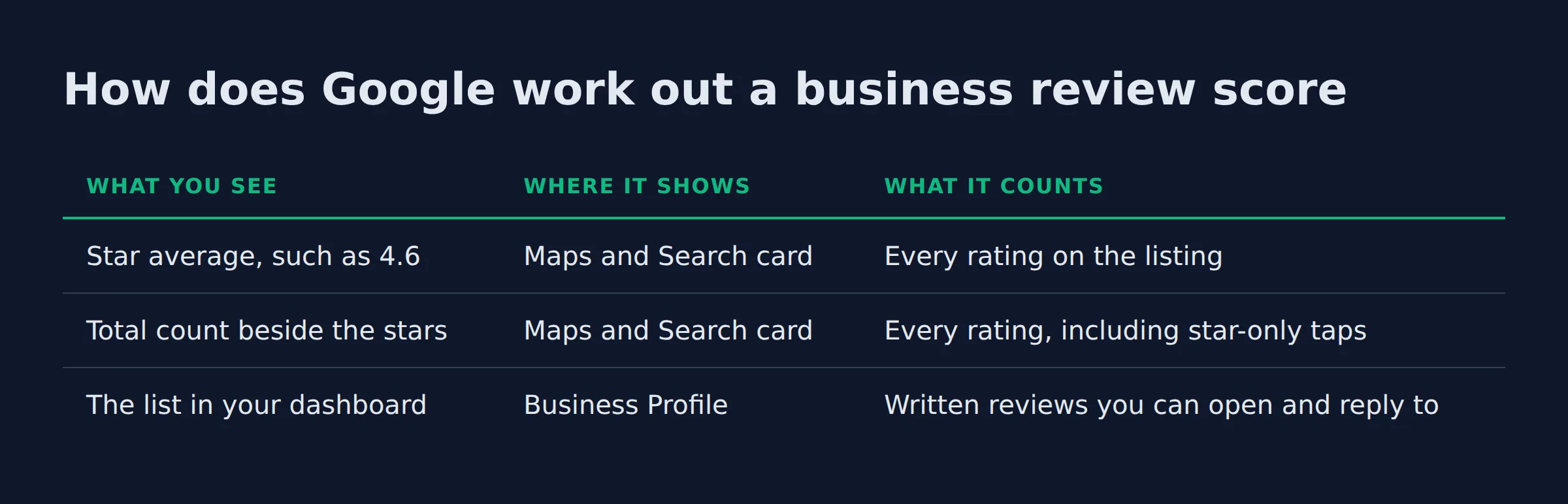
Then there is the gap owners keep asking about. The total on Maps is higher than the number of reviews in the dashboard, and the owner reads that as lost reviews.
The average counts every rating on the listing, including a star tapped with no words. The dashboard lists the written reviews you can open and answer. A star-only rating lifts the average and never becomes a row you can reply to.
We see that gap on almost every profile we audit, and it usually stays small. A gap that widens month after month means ratings are arriving from somewhere the dashboard does not show.
The breakdown, side by side:
| What you see | Where it shows | What it counts |
|---|---|---|
| Star average, such as 4.6 | Maps and Search card | Every rating on the listing |
| Total count beside the stars | Maps and Search card | Every rating, including star-only taps |
| The list in your dashboard | Business Profile | Written reviews you can open and reply to |
A star-only 1-star tap counts in the average, and you will never see it in the dashboard.
Where do your reviews show up, and which ones get seen first?
Reviews show on your Maps listing and on your profile inside Search. They also show in the map pack above local results. Google leads with a set of top reviews, and a reader can re-sort the full list.
Maps and Search read the same listing, so a new review lands in both at once. The map pack, which owners call the 3-pack, is the block of local results above the standard links (local results on Google). It usually shows 3 businesses with a score and a count, and it is often the first thing a customer sees.
Google’s help page splits a listing into 3 separate pieces (how Google calculates review scores):
- The review score.
- A top reviews block.
- The total number of reviews.
The reviews inside that top block are what a customer reads without tapping anything. Google Maps reviews sorting is a reader tool, since anyone can switch the order or filter by star rating. Few bother.
When we open a listing, the default order mixes relevance with rating. The newest review is often not at the top.
An old 1-star can sit near the top for months.
Above the card sits the AI Overview, which Google describes as an AI-generated snapshot with links to dig deeper (AI Overviews in Google Search). The score and the recent reviews are what that snapshot has to work with.
A reply sits under the review a stranger reads, so answer your newest ones first.
Does a competitor with 300 reviews beat you automatically?
No. Distance from the searcher and category match can put a 40-review shop above a 300-review shop in the same map pack.
Google’s local ranking page lists 3 factors and puts review count and star rating inside the third one, prominence (local ranking factors). More reviews and positive ratings can help your local ranking.
So when an owner tells us a smaller shop is winning, we check 3 things first:
- The distance from the searcher to each listing.
- The category on each profile.
- The dates on those 40 reviews.
Those 3 checks explain most of the gaps that look like a review problem.
There is no target count for how many Google reviews you need to rank. The count matters against the shops in your map pack. It matters less than the distance between you and the person searching.
Review velocity is how often new reviews land. One profile collected reviews through the year, and another stopped 3 years ago with a high total still in place. The first one reads as a business that is still working.
Distance and category decide more map-pack slots than review count does.
Can you buy Google Maps reviews?
No. Paid reviews, and reviews traded for a discount or free work, break Google’s policy and get removed. Google also treats unusual review patterns as manipulation.
Google’s prohibited and restricted content page says contributions must reflect a genuine experience (Google’s review policy). It names paid reviews and incentive-backed reviews as fake content that gets removed.
Offering a discount or free work for a review counts as an incentive. The same rule covers a request to change or remove a bad review.
The search results show how much of this market runs on sellers. DataForSEO puts the phrase at 8,100 US searches a month in our October 2026 pull. In the same pull, 4 of the top 10 organic results sell fake Google reviews or explain how to trade them.
Before we check anything else on a profile, we read the dates. A burst with nothing before it and nothing after it looks like a purchase. A steady line looks like a habit.
The accounts matter too. A wall of reviews from profiles with no other activity is the pattern Google’s policy calls unusual volumes or patterns of reviews.
A burst from accounts with no history is the clearest seeded shape we see, and Google names that pattern as manipulation.
What a review tab pattern tells us
We sort every review tab we audit into 1 of 4 shapes, and the shape tells us more than the average does.
| Shape of the review tab | What it usually means | First move |
|---|---|---|
| Steady through the year | The ask runs with every job | Keep the ask, reply to the newest |
| One burst, then quiet | A push after a bad month | Put the ask into the job close |
| Quiet for years, high total | Old reviews carry the score | Ask again this week |
| Clumps on the same days | Possible seeding | Read the policy before copying it |
A shape takes a minute to read, and the dates behind it are public. A keyword tool cannot show you this shape. It only appears when you open the tab.
The dates on the tab explain where the average came from.
What should you check on your own listing before you ask for another review?
Check your listing details against your site and confirm the category fits the work. Then answer the last 10 reviews and test your request link on your own phone. Do all 3 before you send another request.
Start with the details, because a wrong one sends customers to another door. NAP consistency means the business details on your profile match your website.
Then the replies. An unanswered review reads as a business with nobody at the desk, and the next customer notices the silence before they read the complaint.
Next, the request link. Google builds a link and a QR code for your listing, and a customer needs a Google Account to leave a review (tips to get more reviews). Test the link on your own phone before it goes on an invoice.
We run these checks on every profile before a request goes out. When the work runs through Local Biz Boost, the fixes land first and the ask goes out second.
One more check sits on the website. The AggregateRating markup has to match reviews a reader can see on the page. Google also says not to aggregate ratings from other sites (review snippet structured data).
Google review management for small business is mostly sold as a monthly report. This list is the part that changes what a customer sees.
The wording that gets a reply is in how to get more Google reviews. The reply and flag routine is in where to find and manage your reviews.
If a customer asks how to leave one, send them how to write a Google review. If you want the ask to sound like you, how to ask customers for reviews without being pushy has the wording.
A new review on a listing with the wrong category still sends the customer away.
Where to start this week
Open your listing in Maps and read the last 10 reviews the way a customer would. Note what is missing.
No reply under the 2-star from March. No review newer than last winter.
Fix one thing today. Then send the request link to the last 3 customers who said thank you.
If you want a straight read on where your Google visibility stands, a 15-minute call covers it.
FAQ
Can you delete a Google Maps review you do not like?
No, unless it breaks Google’s content rules. An honest review from a real customer stays, whatever the rating (Google Maps reviews are public). Report the break, then reply in public.
Why did my Google Maps review count drop overnight?
A drop usually means a removal under Google’s content rules, and those removals are permanent (about missing or delayed reviews). Google can also pause user content on a profile for a while, which hides reviews without deleting them.
Do replies to Google Maps reviews help you rank?
They can. Google says positive reviews and helpful replies can help a business stand out (local ranking factors), and a reply gives the next customer a reason to call.
How long does a new review take to show up in the score?
Up to 2 weeks. Google says the score can take that long to update after a new review, even when the review itself is already visible (how Google calculates review scores).
Can you ask a customer to change or remove a bad review?
Yes, you can ask for an update. Google bans any incentive offered for a change or a removal, including a discount or free work (Google’s review policy). Ask once and leave the decision with them.