What Is Edge SEO? How Edge Workers Change a Site
Edge SEO changes titles, redirects and schema at the CDN layer, not in your code. What it fixes, what it breaks, and if a local business can use it.
Owners ask us for the same small change all the time, usually a phone number in the title tag or a redirect nobody ever built. Then the request sits in a developer queue for weeks, and the wrong number keeps showing in Google.
Edge SEO is technical SEO work done at the CDN layer instead of in your website code. Using edge workers such as Cloudflare Workers, you change the response as it passes through the network. Titles, redirects, schema, and headers all change on the way out. It exists to bypass slow developer queues. It is not a ranking tactic on its own.
Searches for the term now mix two things. One is CDN-layer work. The other is an SEO training program that also uses the name Edge. This page covers the first one, and the question under it: can a service business with no developer use any of it?
TL;DR
- Edge SEO runs the fix on the CDN, so the response leaves the network already corrected and nobody has to open the site code.
- Cloudflare Workers starts at a $5 monthly minimum with 10 million requests included.
- It works on a site where you control the DNS zone. Wix and Squarespace run the front door themselves.
- Every edge fix belongs in the developer backlog too, or it turns into debt nobody can see.
How does edge SEO actually work?
An edge worker is a small function that runs on the CDN node nearest the visitor. It reads the response and rewrites the HTML, the headers, or the status code before the browser gets it. The change ships without anyone touching the origin server.
That is edge computing: code that runs inside the network instead of on a server you rent. Workers are serverless, so there is no box to patch.
Dan Taylor coined the phrase during his talk at TechSEO Boost 2018. His team’s research into Cloudflare Workers won that event’s research competition, with Eric Enge and OVH named as finalists who coined edge SEO. Two crawlers, DeepCrawl and ContentKing, described him as a pioneer of the approach.
Cloudflare’s own write-up with Taylor splits the work into 3 phases. The worker can change the incoming request, change the outgoing response, or change the response body using Cloudflare Workers for SEO.
The redirect case shows the shape of it. The worker matches the requested URL against a list and answers with a 301 before the origin is asked anything.
The list sits in Workers KV, so the worker reads one key instead of carrying every redirect in its code. In their test, 20,000 redirects fit into a 128KB Cuckoo filter split across 2 keys. The false-positive rate came out at 0.5 to 1 percent.
That is the mechanism. The part that decides whether it helps you is different: whether the change belongs at the edge at all.
The takeaway: the worker changes the response, not the site, and that one difference explains everything it can fix and everything it can break.
What can you change with edge SEO?
You can change anything that comes back in the HTTP response. That includes titles, meta tags, redirect rules, and hreflang. It also includes robots.txt, security headers, and the JSON-LD in the page body.
Taylor’s own list of use cases covers most of it edge SEO use cases:
- Meta tags: add, edit, or remove a title, description, or canonical.
- Headers: add a security header, or set a
Cache-Controlvalue the CMS will not let you touch. hreflang: Google reads it from the HTML head, an HTTP header, or an XML sitemap, and treats the 3 the same hreflang.robots.txt: serve your own rules instead of the platform default.- Redirects: answer with a 301 or 302 without a server rule.
- Error pages: return a custom 404 or a 5xx response.
- Pre-rendering: hand a crawler a cached HTML version of a single page application.
- Testing: split a page 50/50 and measure both halves.
Security headers are the quiet win here. The worker adds HSTS, Content-Security-Policy, and X-Frame-Options to every response. That covers part of the risk list in the OWASP Top 10 without a developer touching the theme.
Schema is the one to be careful with. A worker can inject a JSON-LD block into the body, even when the CMS already prints one. The result is two versions of your business details on the same page.
If the markup itself is the weak part, the fix is content, not plumbing. Local business schema markup explains what belongs in it.
The takeaway: the edge can change any byte of the response, which is exactly why the list of what you should change stays short.
The 3 checks we run before touching a worker
Before we write a line of worker code, we answer 3 questions in order. If any answer is no, the edge is the wrong tool and we say so on the call.
- Who controls the DNS zone for this hostname. A worker only exists inside a zone you can edit. If the nameservers belong to the host, you have nothing to attach it to.
- What the origin can never do. A code freeze, a platform that blocks header edits, or a developer who has stopped replying. Those are edge cases. A change the CMS can make in 10 minutes is not.
- How you will read back the response. Someone has to confirm the HTML Google receives carries the change. Without that check you are guessing.
On the local sites we audit, the first check ends the conversation more often than the other two combined. We have not found a supported way to put a Cloudflare zone of our own in front of Wix or Squarespace. Both hosts run the front door themselves.
A WordPress install on your own hosting usually can move: point the nameservers at Cloudflare and the zone is yours. The registrar side rarely blocks this, since a domain at GoDaddy can point at Cloudflare’s nameservers GoDaddy nameserver help. The blocker is the host that keeps the zone.
The second check is where owners get surprised. A title the theme already controls does not need a worker. A header the platform will not expose does.
The takeaway: an edge worker is a workaround for a blocked change, and a workaround you cannot measure is worse than the queue.
Which CDNs and tools run edge SEO?
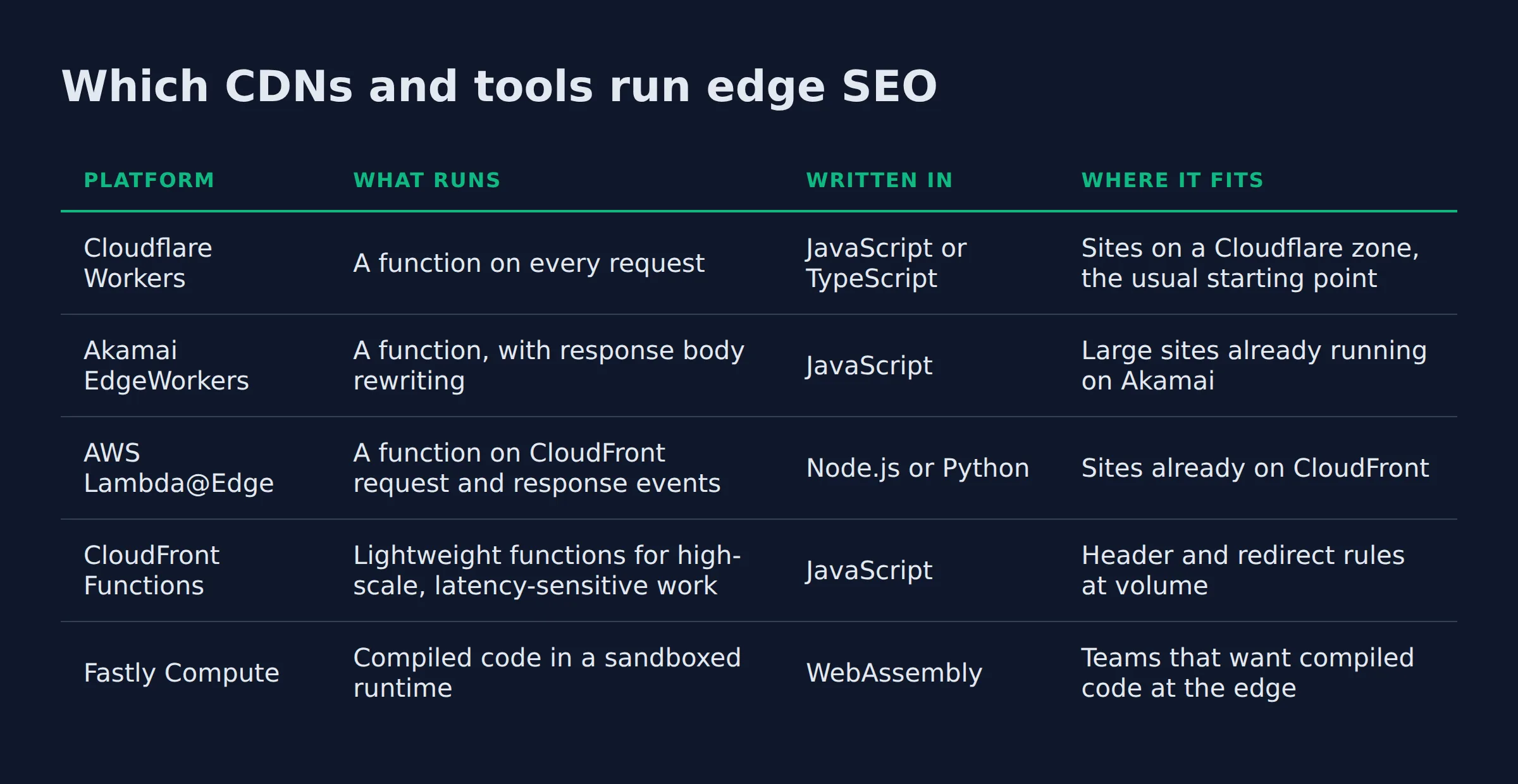
Cloudflare Workers, Akamai EdgeWorkers, AWS Lambda@Edge, CloudFront Functions, and Fastly Compute all run code at the edge. They differ in what the code is written in and how much of the response you can touch.
| Platform | What runs | Written in | Where it fits |
|---|---|---|---|
| Cloudflare Workers | A function on every request | JavaScript or TypeScript | Sites on a Cloudflare zone, the usual starting point |
| Akamai EdgeWorkers | A function, with response body rewriting | JavaScript | Large sites already running on Akamai |
| AWS Lambda@Edge | A function on CloudFront request and response events | Node.js or Python | Sites already on CloudFront |
| CloudFront Functions | Lightweight functions for high-scale, latency-sensitive work | JavaScript | Header and redirect rules at volume |
| Fastly Compute | Compiled code in a sandboxed runtime | WebAssembly | Teams that want compiled code at the edge |
Cloudflare is the platform we start with, and it also publishes a free plan with far lower daily request limits. The Workers paid plan carries a $5 monthly minimum per account. It includes 10 million requests and 30 million CPU milliseconds, then bills $0.30 per extra million requests Cloudflare Workers pricing. Their own example lands a site doing 15 million requests at about $8 a month.
Akamai’s version runs JavaScript bundles and includes response body processing through an HTML rewriter Akamai EdgeWorkers. AWS splits the job in two. Lambda@Edge runs Node.js or Python functions on CloudFront events Lambda@Edge, and CloudFront Functions handles lighter JavaScript work at viewer request time. Fastly compiles the code to WebAssembly and runs it in an isolated sandbox Fastly Compute.
The tooling layer sits on top. Taylor built Sloth for generating and managing the worker code, and SALT.agency lists it among its tools Sloth. His 2019 Search Engine Journal piece names Sloth, Spark, and LogFlare as the tools behind early adoption getting started with edge SEO.
Every option here runs JavaScript. Lambda@Edge also takes Python, and Fastly takes anything that compiles to WebAssembly. If nobody on your side writes code, the platform choice does not matter yet.
The takeaway: pick the CDN your site already sits on. Moving a zone to save a few dollars a month is not worth the migration.
Is edge SEO the same as technical SEO?
Edge SEO is one way to ship technical SEO. The audit is the same audit, and so is the fix list. What changes is where the change lives, on the network instead of in the codebase.
A normal technical fix lands in the code or the CMS, and the next person who opens the site can see it. An edge fix lands in a worker that only exists in a dashboard. The site looks untouched.
That gap causes the failure we see most. An edge fix that never gets queued in the developer backlog becomes permanent debt. The worker holds a title, a redirect, or a schema block that the rest of the site knows nothing about.
The takeaway: file the ticket even when the worker ships first. The fix is temporary until the origin carries it.
Can a small local business use edge SEO?
Edge SEO fits a small business when the site sits behind a zone the owner controls and the fix is blocked by someone else’s queue. It does not fit a site on a host that owns the front door.
Shopify is the clearest case. A merchant reaches the edge only through O2O routing. That means a CNAME record for the domain pointed at shops.myshopify.com, set to proxied. It puts a Cloudflare zone in front of the store Cloudflare’s Shopify O2O guide. Workers and Snippets are disabled on the /checkout path only.
The rest of the store is yours to rewrite, with one limit. robots.txt still comes from Shopify’s theme template rather than from a worker Shopify’s robots.txt guide.
Wix and Squarespace are the harder answer. You get DNS records and no zone of your own to attach a worker to.
WordPress on your own hosting, or a site where you hold the nameservers, is the setup that works. That is also the setup where the list of the pages a local service site needs stops being theory. You can change those pages without waiting on anyone.
What we see across the audits is a gap between the two groups. Owners on a builder host can fix content and their Google Business Profile, and that is the limit. Owners who hold the zone can fix the response itself. That gap is the same one local SEO for service businesses closes from the profile side, where most of the visibility work actually sits.
The takeaway: check who owns your nameservers before you read another word about edge workers. That answer decides the rest.
What breaks when an edge worker goes wrong?
Failures come from 3 places. A page serves stale content. A worker breaks and returns a 5xx to every visitor. Worker output collides with the CMS, which shows up as 2 titles in Google.
The stale page is the one owners notice first, and they notice it through the phone. A worker or a cache layer keeps serving an old number or an old price after the site was updated. The calls do not stop. They just go to the wrong place.
The schema collision is quieter. Two JSON-LD blocks, or a canonical the worker sets while the CMS sets its own, and the page contradicts itself.
The third failure is cost. Every byte a worker adds to a response is latency, and Lighthouse measures it on the next audit as a performance score Lighthouse. A worker that rewrites the whole body of every page will show up there. Core Web Vitals come from real visitors instead, so the lab score and the field score can disagree.
We scope the worker to one route before it goes anywhere near a live site. A wildcard that matches more than you meant is how a header fix on the services pages ends up changing the homepage.
The takeaway: test one route, read the response, then widen. An edge change is invisible on the site, so nothing else will warn you.
How to confirm what Googlebot actually got
Search Console’s URL Inspection tool shows the HTML Google crawled for a specific URL, plus a rendered screenshot of what its inspection tool saw URL Inspection tool. Run it on the exact URL after every edge change.
Open the inspected URL, then use View crawled page to read the code Google stored. Compare that against your browser’s page source. When we do this on a worker-managed page, the mismatch that turns up most is a title or canonical in one version and not the other. Usually the worker rewrites only some user agents.
A plain curl gives you a second read. It shows the HTML the edge returned with no JavaScript involved, which is the layer a worker actually changes.
If the crawled version is older than the change, request indexing for that URL and check again in a few days. An edge change reaches Google the moment Googlebot fetches the page, and not before.
The takeaway: the only proof an edge fix worked is the HTML Google stored. A browser screenshot proves nothing.
FAQ
Is edge SEO a ranking factor?
Google does not evaluate how a change was deployed. It indexes the HTML that arrives. A better title helps because the title is better, whether a developer shipped it or a worker did.
Do you need a developer to set up an edge worker?
You need someone who can read JavaScript. Sloth builds worker code through a dashboard, so the writing is partly handled. Someone still has to review it before it runs on a site that takes calls.
Can you do edge SEO on Shopify, Wix, or Squarespace?
On Shopify, yes, through O2O routing. A proxied CNAME to shops.myshopify.com puts your Cloudflare zone in front of the store, and Workers stay disabled on /checkout only Cloudflare’s O2O guide. Wix and Squarespace manage the front door themselves, so you get DNS records and no zone to attach a worker to.
What does edge SEO cost for a single site?
Start with the Cloudflare Workers paid plan: a $5 monthly minimum, 10 million requests and 30 million CPU milliseconds included Cloudflare Workers pricing. A site doing 15 million requests at 7ms of CPU lands near $8 a month on their own example.
Does an edge change show up for Google the same way it shows for a visitor?
Usually yes, because the worker sits in front of every request. The two versions split when the worker is scoped to one user agent or one cache state. That is why we read the crawled HTML instead of the browser view.
What happens if you delete the worker?
The change disappears on the next request, and the page reverts to whatever the origin serves. That is the honest test of the fix: if the CMS still cannot make the change, deleting the worker exposes it.
If you want a straight read on where your Google visibility stands, a fifteen-minute call covers it: book a time.